
Issue:
A website using HTTP/2 over cleartext (h2c) behind an NGINX reverse proxy with HTTP/2 enabled fails to load on Apple devices (iPhone, iPad) using Safari. The issue was traced to an Upgrade header being added by Apache during the protocol upgrade from HTTP/1.1 to h2c. This caused Safari to throw the error:
“The operation couldn’t be completed. Protocol error” (NSPOSIXErrorDomain:100) in the browser console.
Root Cause:
Safari on Apple devices does not handle the Upgrade header correctly when attempting to switch from HTTP/1.1 to h2c. The presence of this header disrupts the connection, leading to the protocol error.
Solution:
To resolve the issue, the Upgrade header needs to be hidden in the NGINX configuration. This can be achieved by adding the following directive:
nginx
Copy
proxy_hide_header Upgrade;
This directive ensures that the Upgrade header is not forwarded to the client, preventing Safari from encountering the protocol error.
Implementation:
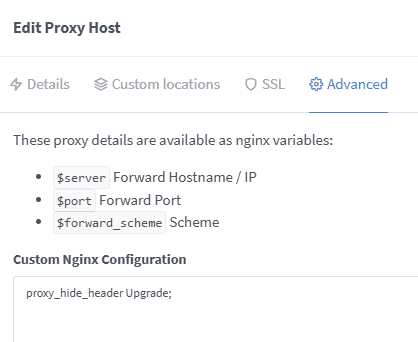
- In NGINX Reverse Proxy Manager:
- Navigate to the Advanced tab of the proxy host configuration.
- Add the following line:nginxCopyproxy_hide_header Upgrade;
- Save and apply the configuration.
- Directly in NGINX Configuration:
- Edit the NGINX configuration file (e.g.,
/etc/nginx/nginx.confor the specific site configuration). - Add the following line within the
locationorserverblock:nginxCopyproxy_hide_header Upgrade; - Reload NGINX to apply the changes:bashCopysudo nginx -s reload
- Edit the NGINX configuration file (e.g.,
Verification:
To test the solution, I used BrowserStack (https://live.browserstack.com) to simulate Safari on an iPhone and iPad. After applying the fix, the website loaded successfully without any protocol errors.
Conclusion:
Hiding the Upgrade header in NGINX resolves the compatibility issue with Safari on Apple devices, ensuring seamless access to the website. This solution is particularly useful for environments where h2c is used behind an NGINX reverse proxy.